Restoring Key Windows Functionality
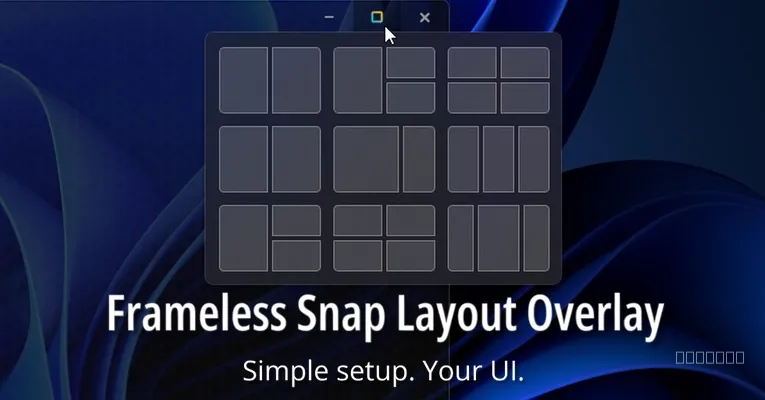
A new plugin called tauri-plugin-snap-layout now allows Tauri v2 applications running in borderless mode to fully utilize Windows 11's native snap layout overlay. This solution addresses a common issue where custom-designed, decoration-free apps on Windows 11 lose access to this essential window management feature.
Bridging the Gap for Custom Interfaces
The developer created this plugin after finding no existing solution that perfectly integrated the Windows 11 snap layout with a sleek, custom application look. It aims to provide a focused fix for applications that disable native window decorations in Tauri, which typically removes the snap layout functionality.
How the Plugin Operates
The plugin works by tracking a specific HTML element ID on the application's frontend to get its dimensions. It then creates a transparent native overlay, effectively tricking Windows 11 into displaying the native snap layout when a user hovers over a custom maximize button. This clever approach ensures that custom UI designs do not compromise core operating system features.
Beyond displaying the overlay, the plugin also intercepts WM_NCHITTEST messages to precisely position the snap layout over the custom button. It handles clicks, acting as a native maximize/restore toggle, and preserves UI states by forwarding hover events to the frontend, forcing CSS :hover states to trigger correctly.
Simple Integration and Cross-Platform Safety
Despite the complex problem it solves, the plugin is designed for straightforward integration into Tauri v2 projects. It operates safely across different platforms, performing no operations on macOS, Linux, or Windows versions older than Windows 11.
- Add the
tauri-plugin-snap-layoutcrate to yourCargo.tomlfile. - Run
npm install tauri-plugin-snap-layoutto include the frontend package. - Ensure
"snap-layout:default"is added to Tauri permissions indefault.json. - Set
"decorations": falsein yourtauri.conf.jsonfor borderless mode. - Initialize the plugin in
lib.rsusing.plugin(tauri_plugin_snap_layout::init().button_id("your-custom-id").build()). - Assign the specified ID to your HTML's custom maximize button element.
Key Points
- The tauri-plugin-snap-layout enables Windows 11 snap layouts for borderless Tauri v2 apps.
- It works by creating a transparent native overlay over a custom maximize button.
- The plugin intercepts
WM_NCHITTESTmessages and handles mouse events. - Installation involves adding a crate, npm package, and configuring Tauri settings.
- It is designed to perform no operations on macOS, Linux, or older Windows versions.
The Bottom Line
For developers building custom-looking Tauri v2 applications on Windows 11, this plugin offers a crucial fix. It allows for modern, borderless designs without sacrificing the native window management features users expect. This focused solution simplifies development, letting engineers create polished applications more efficiently.